Best Local LLM for 8GB VRAM Coding? I Tried Everything.
Published: May 23, 2026
LOCAL AI / BUDGET HARDWARE
Gemma 4 killed my KV cache. Dense Qwen crawled at 3 tok/s. After weeks of testing local LLMs on a GTX 1070, one setup finally stopped fighting me.
After weeks of testing Gemma 4, dense Qwen, BeeLlama.cpp, and every “8GB-friendly” setup Reddit recommended, only one actually felt usable for real coding work.
If you just want the answer:
The best local LLM for 8GB VRAM coding right now is probably Qwen3.6–35B-A3B running through llama.cpp with--n-cpu-moe enabled.
Every local LLM thread eventually turns into someone benchmarking a 70B model on a 4090 and calling it “surprisingly accessible.”
Meanwhile my GTX 1070 sounds like it’s preparing for takeoff every time llama.cpp starts loading weights.
So I went looking for the best local LLM for 8GB VRAM coding because honestly, I got tired of reading advice written by people whose GPU costs more than my entire desktop.
And after a few weeks of testing different setups, I think most “8GB compatible” recommendations are technically true in the same way sleeping in your car is technically a housing solution.
Yes, the models load.
That’s not the same thing as usable.
There’s a huge difference between:
the model generates tokens
and
you can leave it running on a coding task without the whole setup collapsing into a 3 tok/s swamp.
That gap matters way more than benchmarks do.
Especially for agentic coding.
Why Most Local LLM Setups on 8GB VRAM Fall Apart
The weird part is that loading the model usually isn’t the problem anymore.
Quantization got good enough that almost anything can be bullied into memory if you compress it hard enough and throw enough system RAM at llama.cpp.
The problems show up later.
Usually around the point where your coding agent has:
- Opened twelve files
- Dumped stack traces into context
- Retried the same broken test four times
- and quietly accumulated 40k tokens of garbage memory
That’s when the “works great on my machine” setups start dying.
Two things consistently killed performance for me:
1️⃣ KV Cache Growth
This is the real VRAM killer on long coding sessions.
Fresh context benchmarks are misleading because almost every model feels fast at 4k context. The collapse happens later, when the KV cache starts eating memory alongside the model itself.
Gemma 4 was especially bad here.
Around 30–40k context, I could literally watch VRAM disappear in nvtop while generation slowed to a crawl.
And coding agents hit long context fast. Faster than most people expect.
A single debugging session can accumulate:
- Tool calls
- Logs
- Diffs
- Retries
- Terminal output
- File contents
- Reasoning traces
Suddenly your “small task” is dragging around half a novel worth of context.
2️⃣ PCIe Bottlenecks on Dense Models
Dense models on 8GB feel terrible once offloading starts.
Technically the setup works. Practically llama.cpp starts hauling weights back and forth between VRAM and RAM every forward pass like it’s carrying groceries up apartment stairs.
I tested Dense Qwen3.6–27B this way.
Around 3 tok/s.
Which sounds survivable until the agent makes a mistake and spends the next several minutes slowly explaining the mistake it slowly made.
That was the point where I realized most people defining “usable” have a much higher tolerance for suffering than I do.
The Candidates I Actually Tested (And What Broke)
Gemma 4 26B MoE
This one genuinely tricked me at first.
On paper it looks perfect for budget hardware:
- MoE architecture
- Smaller active parameter count
- Reasonable quant sizes
- Decent coding performance
Short sessions felt great.
Then context grew and the KV cache started eating the machine alive.
At around 32k tokens, performance became inconsistent enough that I stopped trusting unattended runs entirely.
That became the pattern with almost every “8GB-ready” setup:
fine at the beginning,
terrible once the session became realistic.
Single-turn coding help? Sure.
Long agentic sessions? I gave up on it pretty quickly.
I actually spent a full week trying to make Gemma 4 behave locally because on paper it looked like the perfect budget setup. The longer I tested it though, the stranger the KV cache behavior became. I’ll probably write that up separately because some of the degradation patterns were genuinely weird.
I Ran Gemma 4 Locally. Here’s What Nobody’s Telling You.

Dense Qwen3.6–27B
I understand why people love this model.
I also understand why most of those people own more VRAM than I do.
With 32GB system RAM, I got it running through layer offloading in llama.cpp.
The problem was speed.
Or more specifically: accumulated waiting.
I gave it a normal coding task:
- Refactor a module
- Write tests
- Fix failures
The full loop took around 40 minutes.
Not because the model was dumb.
Mostly because inference felt like wading through wet cement.
The psychological effect surprised me more than the benchmark numbers did.
You stop experimenting when every mistake costs another ten minutes.
That part surprised me more than the benchmarks did, honestly.
Slow inference changes how you think. You become weirdly conservative. You stop trying ideas because every failed attempt turns into another coffee break.
BeeLlama.cpp
This one felt like driving a heavily modified project car.
Sometimes incredible.
Sometimes concerning.
The throughput gains are real. Short-context speed noticeably improved on my GTX 1070, even compared to standard llama.cpp.
But I also hit:
- One hard segfault
- One silent inference hang
- And one session where my coding agent waited forever because the server quietly died mid-task
That matters more for coding agents than regular chat.
If I’m sitting there babysitting inference, fine.
If I leave for coffee and come back to a dead process after an hour-long task, the performance gains stop feeling very important.
I still think BeeLlama.cpp is worth watching though. It just feels early.
The One Setup That Actually Worked
The weird answer ended up being the model I originally ignored:
Qwen3.6–35B-A3B.
I ended up using a GGUF quant through Hugging Face, mostly because the llama.cpp workflow gave me more control than Ollama did.
The name alone made me assume there was absolutely no way this thing would behave on 8GB VRAM.
But because it’s MoE and only around 3B parameters stay active during inference, the real footprint is much smaller than the headline number suggests.
That changes everything about how the system behaves under load.
More importantly: The KV cache behavior stayed stable.
That was the real breakthrough.
Not peak benchmark speed.
Not first-token latency.
Just consistency during ugly, realistic, long-running coding sessions.
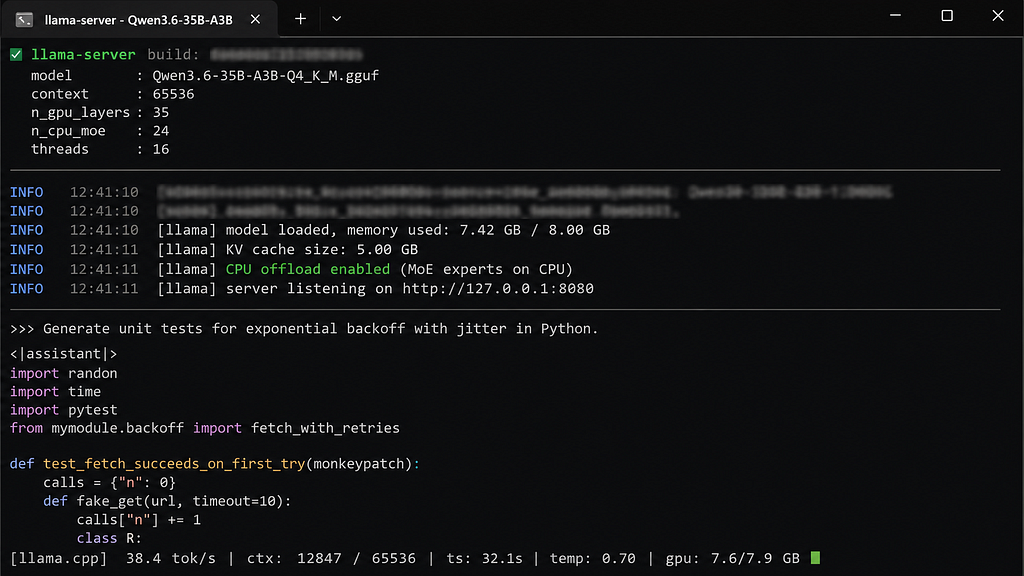
Fresh context on my GTX 1070 sits around:
- 35–40 tok/s early
- 20-ish tok/s during longer sessions
And honestly? Once the speed stays predictable, your brain stops thinking about the hardware constantly.
That’s the first time local coding on 8GB stopped feeling like a science experiment to me.
The llama.cpp Flag That Made the Biggest Difference
This was the command that finally stopped fighting me:
./llama-server \
  -m Qwen3.6-35B-A3B-Q4_K_M.gguf \
  --n-gpu-layers 99 \
  --n-cpu-moe \
  --ctx-size 65536 \
  --flash-attn \
  -ctk q4_0 \
  -ctv q4_0 \
  -t 8
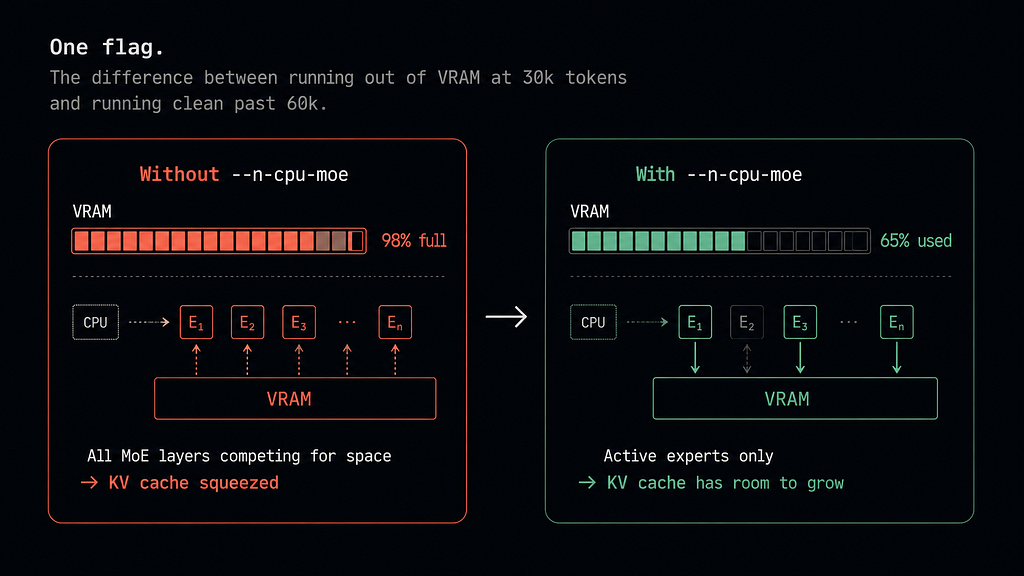
The important flag is:
--n-cpu-moe
That one matters way more than most people realize.
Without it, inactive MoE experts still create enough VRAM pressure that the KV cache starts competing for memory during long sessions.
With it, memory behavior becomes predictable enough that sessions stop randomly collapsing near the 30k-token mark.
That stability mattered more than raw speed.
Is Local Agentic Coding on 8GB VRAM Actually Viable?
Honestly?
Yeah. More than I expected.
Not “replace a cloud 4090 cluster” viable.
Not “run giant autonomous repo agents for 14 hours” viable.
But absolutely viable for:
- Focused coding sessions
- Feature implementation
- Debugging
- Test iteration
- Medium-sized refactors
Especially if you pair:
- 8GB VRAM
- 32GB RAM
- Qwen3.6–35B-A3B
- llama.cpp
- KV cache quantization
The funniest part is that the setup people kept dismissing as “too weak” was the first one that actually let me stop thinking about hardware and just code.
That’s probably the real benchmark.
I’ve also been experimenting with replacing cloud coding assistants entirely with local setups. That’s probably the next rabbit hole because the tradeoffs get weird fast once you start comparing local models against tools like Copilot or Claude Code directly.
I Replaced GitHub Copilot With a Local Setup. Here’s What Nobody Tells You
If you’ve been waiting to try local agentic coding until you could “afford a proper GPU” — you don’t have to wait.
The setup exists.
It’s just buried underneath a lot of benchmark screenshots from people running hardware most normal developers don’t own.
Honestly, that was probably the most useful thing I learned from all of this.
A message from our Founder
Hey, Sunil here. I wanted to take a moment to thank you for reading until the end and for being a part of this community. Did you know that our team run these publications as a volunteer effort to over 3.5m monthly readers? We don’t receive any funding, we do this to support the community.
If you want to show some love, please take a moment to follow me on LinkedIn, TikTok, Instagram. You can also subscribe to our weekly newsletter. And before you go, don’t forget to clap and follow the writer️!
Best Local LLM for 8GB VRAM Coding? I Tried Everything. was originally published in Artificial Intelligence in Plain English on Medium, where people are continuing the conversation by highlighting and responding to this story.

