I Built a Gemma 4 AI Agent. It Kept Looping Until I Fixed This.
Published: April 26, 2026
What Google Actually Shipped
I built a local AI agent, and it broke in ways nobody explains (here’s the fix)

I spent the last two weeks building a Gemma 4 local AI agent.
It worked… until it didn’t.
Not benchmarking it.
Not running a single “Hello World” prompt and calling it a day.
Actually building:
- Tool calls
- File reads
- Multi-step reasoning
- Real tasks
And then it broke.
My Gemma 4 local AI agent kept calling the same tool over and over again.
It wouldn’t stop.
If you’ve read my earlier breakdown. You already know I don’t care about hype. 👇🏻
I Ran Gemma 4 Locally. Here’s What Nobody’s Telling You.
That article was about performance.
This one is about what happens when you try to build something real.
Some things worked better than anything I’ve run locally before.
A lot of things didn’t.
And the fixes were almost never obvious.
Here’s everything I found: Including the exact config that finally made Gemma 4 local AI agent stable.
What “Agentic” Actually Means for Gemma 4
To understand why things break, you need to understand what you’re actually running.
Gemma 4 is the first model in Google’s open-weight family with native function calling built in.
Not hacked through prompts.
Not bolted on through wrappers.
Trained into the model.
That changes everything.
Earlier local models (Mistral, LLaMA variants) could use tools, but only if you forced them.
Gemma 4 understands the loop:
- Call tool
- Receive result
- Reason
- Decide on the next step
The 26B MoE variant is the one most developers are running locally.
- ~4B active params at inference
- ~80–110 tokens/sec on RTX 3090
Fast enough for real agent workflows
So the hardware story is real. The agent's story is where it gets complicated.
The First Bug That Kills Your Agent: Infinite Tool Loops
Day 1: Everything broke.
I gave the agent a simple task:
- Read file
- Summarize
- Write report
What happened:
- read_file
- read_file
- read_file
- forever
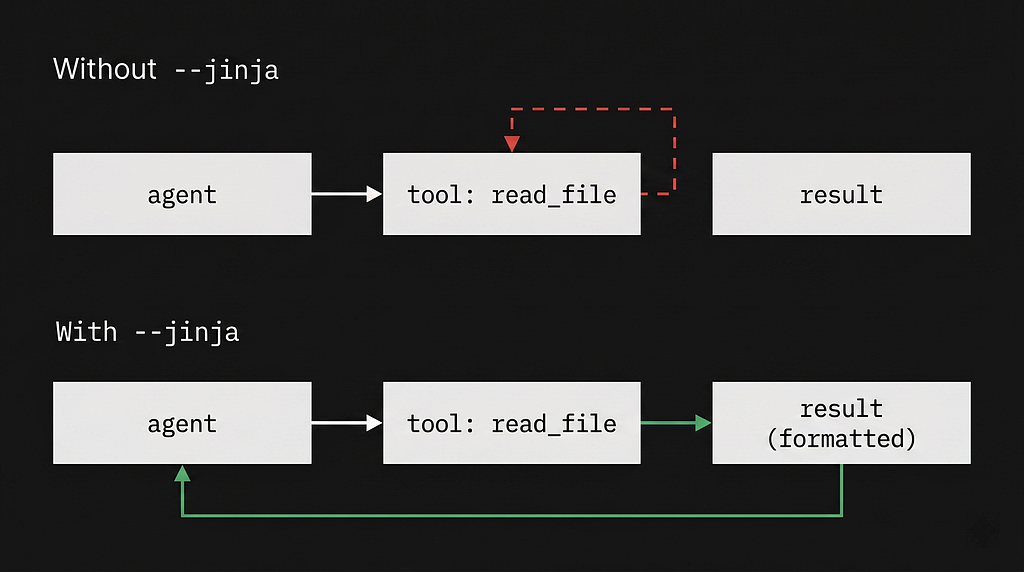
The agent called read_file. Got the result. Then called `read_file` again. And again. It never moved forward.
This is the most common failure mode right now, widely discussed in communities like r/LocalLLaMA.
Root cause
The model never actually receives the tool result properly.
So it keeps retrying the same call.
The Fix (Most People Miss This)
The fix is in how you format the tool result message back to the model. Most frameworks append the result as a plain text string.
Gemma 4 expects tool responses in a specific chat template format.
Not plain text.
If you’re using the llama.cpp server:
👉 You NEED the -- jinja flag
llama-server \
  -m ./gemma-4-26B-A4B-it-Q3_K_M.gguf \
  --port 1234 \
  -ngl 99 \
  -c 32768 \
  --jinja \
  -ctk q8_0 \
  -ctv q8_0
Without it:
- Tool responses are injected incorrectly
- The model loses state
- Loops forever
This single flag fixes most “Gemma 4 agent looping” issues!
That -- jinja The flag is not optional for agentic work. It enables the Jinja2 chat template parser, which is what correctly formats tool results. I missed it for the first three days and couldn’t understand why every agent run turned into a loop.
If this feels familiar, it’s the same pattern I saw earlier — models appearing correct until you actually push them into real workflows:
→ I Ran Gemma 4 Locally. Here’s What Nobody’s Telling You
Bug #2: The Thinking Loop That Never Closes
The model never stops thinking
Gemma 4 has a built-in reasoning mode. Gemma 4 uses <think> tags internally for reasoning.
During agentic tasks, this sometimes breaks.
The model opens a <think> tag and simply never closes it.
I sat and watched a single agent step burn through 15,000 tokens doing nothing useful.
The Counterintuitive Fix
Set your temperature to exactly `1.0` and `top_k` to `40`.
You’d expect lower temperature = stability.
Wrong.
For Gemma 4:
Temperature must be EXACTLY 1.0
params = {
    "temperature": 1.0,
    "top_k": 40,
    "top_p": 0.95,
    "repeat_penalty": 1.1
}
Why?
At temperature: 1.0It has just enough variance to break out of the loop.
- Low temperature reinforces bad loops
- 1.0 , giving just enough randomness to escape
This is one of those fixes nobody tells you.
Bug #3: Context Collapse (Even with 256K)
The Context Window Is Real, But Context Management Isn’t Free
Yes, Gemma 4 supports massive context.
Gemma 4’s 26B model supports up to 256K context.
Yes, it works.
But…
Practically, it changes how you think about agent design, but not in the way the marketing suggests.
Long context ≠ reliable agent memory
Running an agent with a long context is not the same as running one with a well-managed context.
Here’s what happens at around the 80K token mark in a multi-step agent run:
- Tool calls repeat
- Results get hallucinated
- Decisions contradict earlier steps
The Real Fix: External State
Stop relying on the model to remember everything.
Instead:
I now inject a structured, fresh system prompt at every single turn
system_prompt = f"""
You are a task-completing agent.

ORIGINAL TASK: {task}

TOOLS AVAILABLE: {tool_descriptions}

COMPLETED STEPS SO FAR:
{completed_steps_log}

Your job: decide the next action.
"""
This is the biggest reliability upgrade you can make.
The model doesn’t have to remember its history. It just has to look at the immediate payload and decide the next action.
Hidden Problem: The llama.cpp Build Problem Nobody Mentions
This one is specific to a window of llama.cpp builds from late March 2025.
If you are seeing random character insertions mid-generation
e.g., “The file contaiens the folloiwng data…”
You do not have a model quality problem.
You have a build problem.
A window of llama.cpp builds from late March 2026 introduced an inference bug that causes random typos.
Check your build version:
llama-server - version
Fix:
- Use b3000+ (recommended)
- b3447+ (with flash attention)
If you are in the b28xx range, update immediately. You want b3000+ for general inference, or b3447+ for full flash attention support.
The Config That Actually Works For A Gemma 4 Local AI Agent
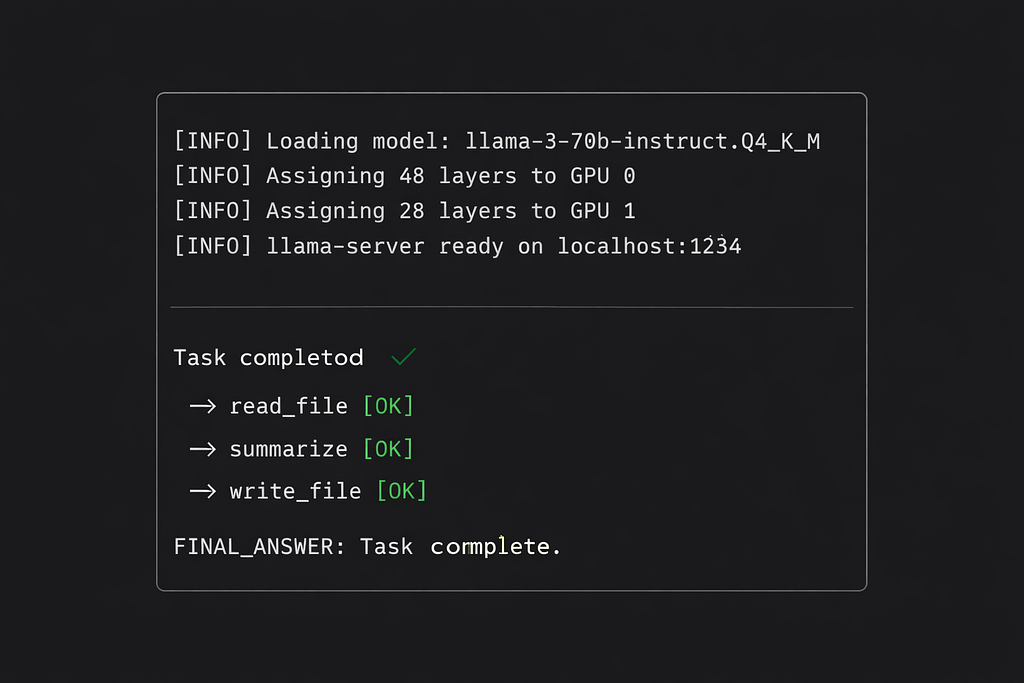
After two weeks of testing, here is the definitive, stable setup for running a Gemma 4 local AI agent.
If you want this to work without burning hours of your life, follow these rules exactly:
Model
- Unsloth Q3_K_M quant gemma-4–26B-A4B-it-Q3_K_M.gguf (from Hugging Face ecosystem)
Inference Server
llama-server \
  -m ./gemma-4-26B-A4B-it-Q3_K_M.gguf \
  --port 1234 \
  -ngl 99 \
  -c 32768 \
  -np 1 \
  --jinja \
  -ctk q8_0 \
  -ctv q8_0
Inference params
{
  "temperature": 1.0,
  "top_k": 40,
  "top_p": 0.95,
  "repeat_penalty": 1.1,
  "max_tokens": 2048
}
Why these specific values
- -np 1 avoids memory overflow
- -ctk q8_0 -ctv q8_0 quantizes the KV cache, cutting it from ~940MB to ~499MB, that headroom matters.
- --jinja is non-negotiable for tool calling. Everything breaks without it.
- Q3_K_M from Unsloth, not just any Q3_K_M. Unsloth’s quants are calibrated differently and perform noticeably better on reasoning tasks.
- temperature: 1.0 exactly. Not 0.9. Not 0.7. 1.0.
If you’re trying to push this into real-world usage, this connects directly with how I built production workflows:
I Automated 80% of My Workflow With AI
What Actually Works Well
This isn’t a takedown post.
Gemma 4 is the first local model where agents feel real.
What works:
- Single-step tasks => very reliable
- Code generation => surprisingly strong
- Long context reasoning => legit
I built a workflow where the agent reads a buggy file, writes a fix, and runs a validator.
It completed the loop successfully 80% of the time on the first try.
For an entirely offline model, that is staggering.
For any developer who wants to run a private, offline, zero-API-cost coding agent: Gemma 4 is the first local model I’ve used where that feels genuinely viable rather than just technically possible.
The model is capable. The configuration is what determines whether your agent works or loops forever.

Here are some Questions which were concerning to me before I started building. I’ll clear them up now for you:
Does Gemma 4 support tool calling locally?
Yes. Fully offline. No API needed.
Using llama.cpp or Ollama, tool calling works, but requires proper formatting -- jinja.
Why does my Gemma 4 agent loop forever?
Because tool responses aren’t formatted correctly.
Fix: Use -- jinja So the model receives structured tool outputs.
Best quantization for Gemma 4 local agent?
Unsloth Q3_K_M (via Hugging Face ecosystem)
Best balance of:
- Performance
- VRAM
- Reasoning stability
Summing it up
Gemma 4 is the first local model that made me stop thinking of on-device agents as a demo and start thinking of them as a real workflow.
Not because it works.
But it almost works reliably.
And that gap?
The model isn’t the problem.
Your configuration is.
I’m documenting everything I learn about local AI systems, LLM agents, and real-world setups.
If you want:
- Working configs
- Real failures
- No hype
Follow along ❤️
A message from our Founder
Hey, Sunil here. I wanted to take a moment to thank you for reading until the end and for being a part of this community. Did you know that our team run these publications as a volunteer effort to over 3.5m monthly readers? We don’t receive any funding, we do this to support the community.
If you want to show some love, please take a moment to follow me on LinkedIn, TikTok, Instagram. You can also subscribe to our weekly newsletter. And before you go, don’t forget to clap and follow the writer️!
I Built a Gemma 4 AI Agent. It Kept Looping Until I Fixed This. was originally published in Artificial Intelligence in Plain English on Medium, where people are continuing the conversation by highlighting and responding to this story.

