I Ran Qwen3.6 Locally. The Thinking Mode Changed How I Use It
Published: May 6, 2026
This Isn’t What the Leaderboards Show
I tested Qwen3.6–27B locally using Ollama, what the benchmarks skip, why thinking mode matters, and whether it’s worth the setup cost.
I almost ignored it.
Every week, there’s a new model that supposedly changes everything.
At this point, that phrase means almost nothing.
So when Qwen3.6–27B dropped, I skimmed the benchmarks… and moved on.
Then one number pulled me back.
Then I noticed something weird: A 27B model apparently outperforming a 397B one on coding tasks.
That didn’t make sense.
So I did what I usually do: I ran it locally.
So I went back, pulled it locally, and ran it the same way I test everything else no API, no wrapper UI, just Ollama and actual work I had to finish.
And after using it for a few days, I realized:
The benchmarks aren’t the interesting part.
Why I Paid Attention This Time
I’ve been testing local models for a while now.
- I Ran Gemma 4 Locally. Here's What Nobody's Telling You.
- I Replaced GitHub Copilot With a Local Setup. Here’s What Nobody Tells You
After running Gemma 4 locally (which performed surprisingly well in controlled tasks), I didn’t expect another model to shift my workflow this quickly.
But Qwen3.6 did not because it’s bigger or faster.
Because of how it thinks.
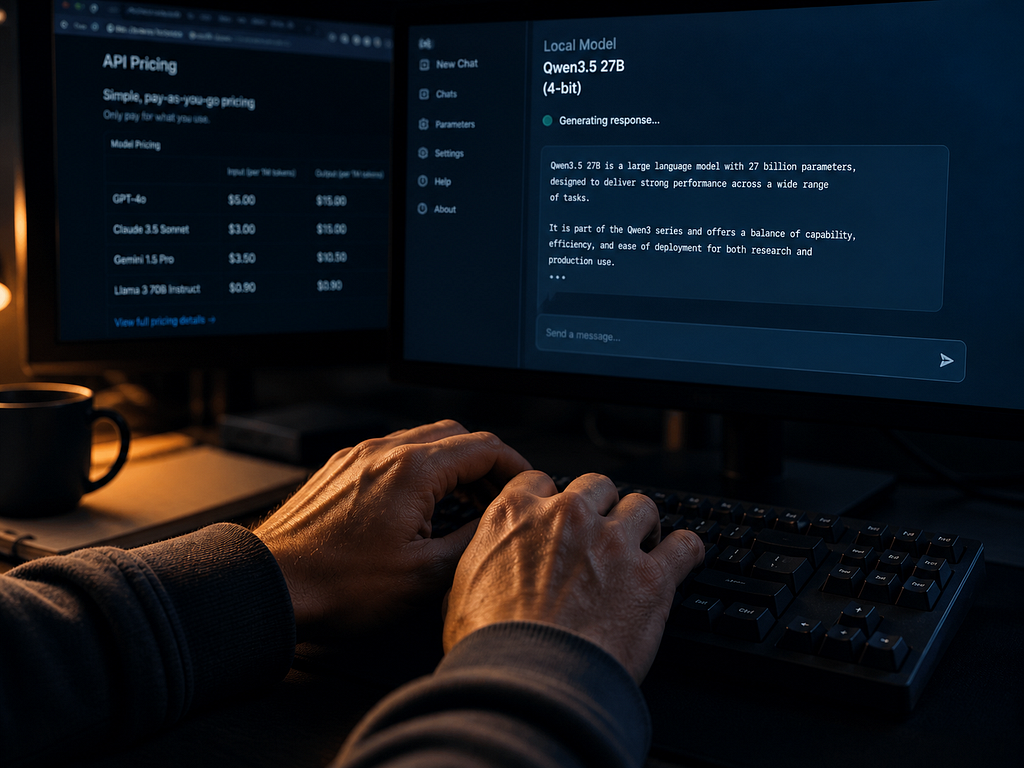
Setting Up Qwen3.6 Locally Is Almost Too Easy
This used to be the annoying part.
This was not always true. A year ago, running a capable model locally meant dealing with dependency hell, quantisation format confusion, and RAM calculations done on the back of a napkin.
With Qwen3.6–27B, the whole thing took about six minutes.
Now it’s… kind of boring:
ollama pull qwen3.6:27b
ollama run qwen3.6:27b
That’s it.
No setup rabbit hole. No weird configs.
The Q4_K_M version is around 17GB, which fits comfortably if you’ve got 24GB VRAM. If not, or runs mostly in RAM if you’re on a machine without a beefy GPU.
On my machine, it booted in under half a minute.
I’m not going to pretend the output speed was indistinguishable.
It’s not cloud fast…
You notice it at first. Especially when you turn on thinking mode. But after a bit, your brain adjusts and stops caring.
The 27B vs 397B Thing Isn’t What It Sounds Like
The Benchmark Confusion (27B vs 397B)
This part gets misrepresented everywhere.
Before getting to thinking mode, it’s worth addressing the thing that made me pay attention in the first place.
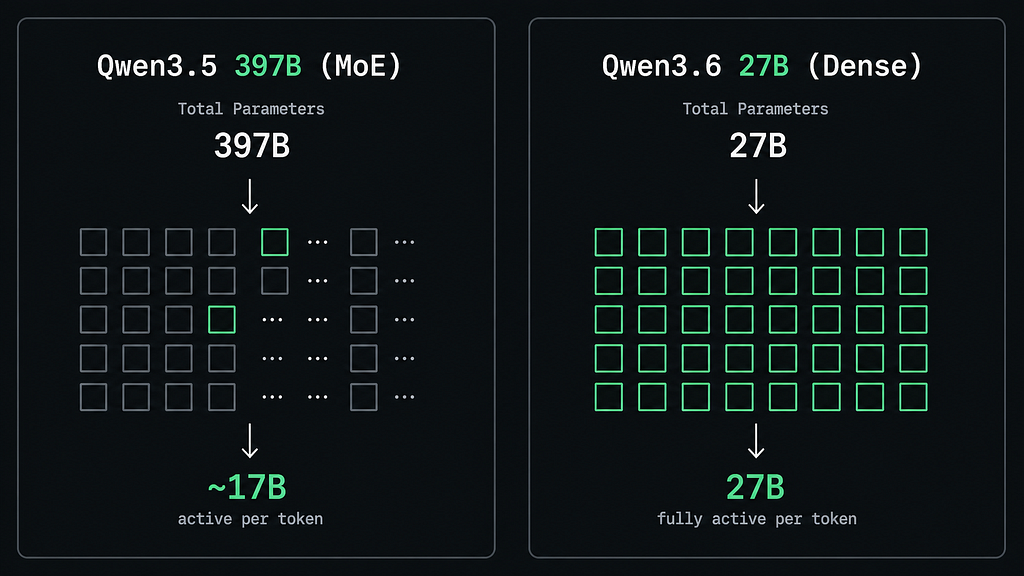
Qwen3.6–27B is a dense model.
Qwen3.5–397B is Mixture-of-Experts.
Which means… the 397B number isn’t really what’s active during inference.
I Tried Gemma 4 Against GPT and Claude for a Week
That headline number? Misleading.
Roughly ~17B parameters are actually being used per token in that MoE model.
So the comparison is closer to:
~17B active vs 27B dense
That’s a very different story.
So what’s actually happening is:
It’s that Qwen’s team trained a dense 27B model efficiently enough that it can compete at that level at all.
That’s the actual story. Most of the posts I read just screenshot the leaderboard without explaining why.
I still find this a bit counterintuitive, honestly my brain keeps wanting to say “but 397 is bigger than 27” but once you understand active parameters, the confusion mostly dissolves.
Thinking Mode Is the Only Feature That Actually Changed How I Used It
This is the part I want to spend time on, because I’ve seen it mentioned in nearly every Qwen3.6 post and almost never explained in practical terms.
So here’s the version after actually using it for a few days:
Qwen3.6 ships with two modes:
Standard generation mode and a “thinking mode” that uses extended chain-of-thought reasoning before giving you an answer.
You can toggle between them mid-conversation.
In Ollama, you can activate it directly in the system prompt, or just ask the model to “think step by step” on harder tasks it recognises the intent.
Qwen3.6 introduces a “thinking mode” a reasoning-heavy generation mode that takes longer but processes tasks more deeply.
Sounds familiar. But the practical difference is where it matters.
Here’s the honest breakdown of what that actually means in practice:
When Thinking Mode Actually Helps
Anything involving logic, debugging, multi-step reasoning, or tasks where the first plausible answer is usually wrong.
I threw a particularly ugly async bug at it, the kind where the error message is pointing at the wrong line, and the thinking-mode response traced through the execution order and caught the real issue.
Standard mode gave me a confident but incorrect fix. That gap was significant.
When thinking mode doesn’t help:
Short, factual lookups. Writing tasks.
Anything where the answer is relatively direct.
In these cases, the thinking mode just adds latency without meaningfully improving the output. I ran a batch of simple questions through both modes, and the results were nearly identical, but the thinking mode was consistently 2–3× slower.
The practical takeaway
Treat thinking mode like a debugger, not a default.
Activate it for the 20% of tasks where you actually need the model to reason carefully. Leave it off for everything else.
Once I settled into that pattern, Qwen3.6 became noticeably more useful than anything I’d run locally before.
There’s also a third approach, and I say this somewhat reluctantly because it involves a prompt engineering pattern I used to roll my eyes at where you explicitly tell the model when to switch modes as part of your workflow. Something like a system prompt that says “use thinking mode for any task involving code review or debugging, standard mode otherwise.” It sounds fussy. In practice, it actually works really well.
Using It for Actual Work (Not Benchmarks)
I used Qwen3.6–27B as my primary coding assistant for three days before writing this.
Not for toy examples, for actual tasks from my Shopify development work.
Here’s what I found:
Code generation: Solid. Not Claude Sonnet-level, but genuinely useful for scaffolding, boilerplate, and explaining unfamiliar library APIs. On straightforward tasks, it produced clean, runnable code more often than not.
Debugging: This is where thinking mode earns its keep. Given a stack trace and relevant code context, it was more methodical than most cloud models I’ve used at identifying the actual root cause rather than the surface symptom.
Long context tasks: I fed it a 4,000 word codebase context and asked questions about architecture. It handled this reasonably well, better than I expected for a local model, though I noticed it started losing track of earlier context on very long exchanges. This is still an area where cloud models have an edge.
Tool calls / MCP: Mixed. Standard prompt-based tasks are fine. If you’re building agents, you’ll hit some of the same tool-call reliability issues that affect most local models at this size. It’s better than Gemma 4 was at launch for this, but I wouldn’t stake a production pipeline on it without thorough testing.
The honest version: Qwen3.6–27B is the first local model where I didn’t feel like I was making a compromise the moment I needed it for something real. Previous “best local models” had a way of suddenly reminding you they were local models. This one does too, occasionally, but the reminders are less frequent.
The Part Nobody Talks About: What You’re Actually Trading
Every “run X locally” article I’ve read eventually turns into an ad for local models. This one isn’t going to do that, because the tradeoffs are real and worth naming.
What you gain: Privacy. Zero per-token cost. No rate limits. The ability to run offline. And — this matters more than people admit — the feeling of actually understanding the tool you’re using rather than renting access to a black box.
What you give up: Raw output speed (cloud models are still faster). The latest models, the moment they drop (cloud APIs deploy updates faster than Ollama catches up). And most practically, the confidence that comes from using a model that’s been tested by millions of people in production.
I don’t know if any of this is true for setups different from mine. On my machine, Qwen3.6–27B made local AI feel genuinely practical for the first time. Whether that applies to a machine with less VRAM, a different workflow, or different tasks — that’s something you’d need to test yourself.
So… Is It Worth Running?
Depends where you’re starting.
If you already use local models, yes immediately!
Qwen3.6–27B is the clearest upgrade to the local model ecosystem in 2026 so far, and the thinking mode genuinely adds capability rather than just being a marketing feature.
If you’re coming from cloud APIs and wondering whether local is worth the setup cost.
The honest answer is that it depends entirely on your use case.
If you’re doing a lot of reasoning-heavy work and you have the hardware, a machine with 24GB VRAM or more, the economics make sense within a few months. If you’re primarily doing quick lookups or short generation tasks, the latency difference will frustrate you more than the cost savings will delight you.
If you’ve never run a local model before, start with the Qwen3.6 7B first.
Get comfortable with Ollama.
Understand how quantisation affects the tradeoffs.
Then graduate to 27B when you know what you’re actually looking for.
The thinking mode alone made this worth an afternoon of my time. Whether it’s worth yours depends on what you’re building.
If you found this useful, I write about local AI setups, developer tools, and the honest side of building with AI. Follow for more.
Or if you are feeling pumped & excited after reading this, you’ll feel the same after reading these:
I Built a Gemma 4 AI Agent. It Kept Looping Until I Fixed This.
A message from our Founder
Hey, Sunil here. I wanted to take a moment to thank you for reading until the end and for being a part of this community. Did you know that our team run these publications as a volunteer effort to over 3.5m monthly readers? We don’t receive any funding, we do this to support the community.
If you want to show some love, please take a moment to follow me on LinkedIn, TikTok, Instagram. You can also subscribe to our weekly newsletter. And before you go, don’t forget to clap and follow the writer️!
I Ran Qwen3.6 Locally. The Thinking Mode Changed How I Use It was originally published in Artificial Intelligence in Plain English on Medium, where people are continuing the conversation by highlighting and responding to this story.

