I Uninstalled BeeLlama. Then v0.2.0 Changed My Mind.
Published: May 27, 2026
BeeLlama • Gemma 4 • DFlash
A week later, it’s still running beside my main llama.cpp setup.
Two crashes in two days. Then 177 tok/s. So I opened the repo again.
A month ago I wrote BeeLlama off for serious agentic coding.
Then v0.2.0 landed with a claimed 177.8 tok/s on Gemma 4 31B. I wasn’t planning to revisit it. A week later, I was using it daily.
A few weeks ago, in my article “Best Local LLM for 8GB VRAM Coding? I Tried Everything”, I mentioned BeeLlama almost in passing.
My verdict wasn’t exactly positive.
Fast when it works. Too risky for long unattended sessions.
At the time, that felt fair.
I’d hit two failures in two days. One ended with a segfault. Another silently stopped making progress during an overnight agent run.
After that, I went back to mainline llama.cpp and stopped thinking about it.
Then BeeLlama v0.2.0 showed up.
The headline benchmark was hard to ignore:
177.8 tok/s on Gemma 4 31B using a single RTX 3090.
Compared to roughly 36 tok/s on llama.cpp, that’s not a small improvement. That’s the kind of number that makes you wonder whether you’re leaving performance on the table.
So I installed it again.
What BeeLlama Actually Is
BeeLlama is a CUDA-focused fork of llama.cpp.
It’s built around a custom attention implementation called DFlash.
The simple explanation is that DFlash reduces how much time the GPU spends moving data during token generation. Instead of changing the model itself, it changes how decoding is performed.
Same model.
Same output.
Much faster generation.
The obvious question is why llama.cpp doesn’t just adopt it.
The answer is that BeeLlama gets to optimize aggressively for CUDA. Mainline llama.cpp has to support CUDA, Metal, Vulkan, ROCm, CPUs, and everything in between.
A CUDA-specific optimization can be excellent and still not fit comfortably into a project designed to run everywhere.
That’s why forks like BeeLlama often become the ecosystem’s R&D lab. Ideas get tested here first before influencing mainstream projects later.
What Changed in v0.2.0
The benchmark numbers grabbed attention.
The changelog is what got mine.
Most of my issues with earlier releases happened around tool calls, reasoning traces, and speculative decoding fallbacks, the places where systems stop taking the happy path.
v0.2.0 introduced:
- Safer verifier fallback logic
- Better handling around reasoning and tool-call boundaries
- Cleaner prefill-to-decode transitions
- Stricter draft-target validation
None of those improvements are exciting on social media.
They’re also exactly the kind of fixes that make software usable.
The funny thing is that the speed numbers weren’t what changed my mind.
If BeeLlama had stayed unstable, 177 tok/s wouldn’t have mattered.
Fast software that crashes is still slow software.
What got my attention wasn’t the benchmark graph.
It was the changelog.
Is It Actually Stable Now?
This is the question that matters.
And the answer is surprisingly simple:
Yes. BeeLlama v0.2.0 is meaningfully more stable than previous versions.
Is it as reliable as mainline llama.cpp?
No.
Would I trust it with production inference serving real users?
Also no.
Would I use it for daily agentic coding?
Absolutely.
Over the past week, I ran multiple long coding sessions involving large repositories, tool calls, test runs, file edits, and debugging loops.
No crashes.
That matters more than ever because local agents are increasingly handling multi-step workflows.
In a previous experiment, I built a Gemma 4 coding agent that kept looping until I fixed a subtle reasoning issue:
I Built a Gemma 4 AI Agent. It Kept Looping Until I Fixed This.
One session briefly paused before continuing, which looked like BeeLlama dropping out of its fast path and recovering cleanly.
Earlier releases probably would have failed there.
This one didn’t.
That’s obviously not a scientific benchmark, but the specific failure modes that pushed me away a month ago have stopped reproducing.
For me, that’s enough to keep using it.
The Speed Numbers
The headline benchmark remains impressive.
Gemma 4 31B
- BeeLlama: 177.8 tok/s
- llama.cpp: ~36 tok/s
- Improvement: ~4.9x
Qwen 3.6 27B
- BeeLlama: ~164 tok/s
- llama.cpp: ~37 tok/s
- Improvement: ~4.4x
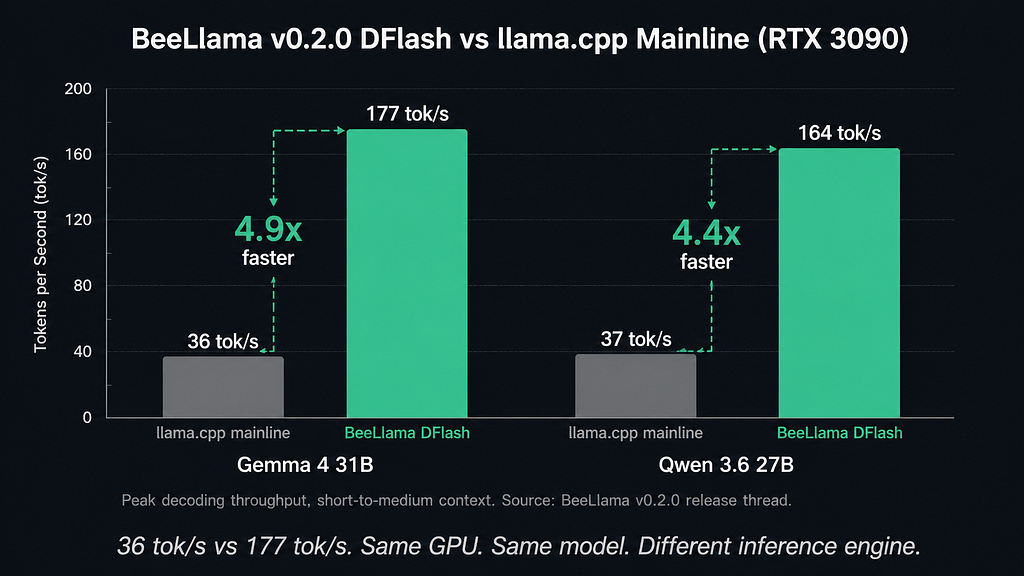
What’s important is where those gains appear.
DFlash primarily accelerates decoding, not prompt processing.
That’s especially relevant if you’re already running larger local models such as Qwen 3.6 in Thinking Mode, where long generations quickly become the dominant cost.
I Ran Qwen3.6 Locally. The Thinking Mode Changed How I Use It
For coding agents, that’s exactly where most of the time is spent.
A single completion finishing two seconds faster isn’t particularly exciting.
An agent making hundreds of tool calls throughout a workday is different.
That’s where the speedup becomes noticeable.
After a week with BeeLlama, switching back to vanilla llama.cpp felt slower than I expected.
That’s usually when an optimization becomes real, when you miss it after it’s gone.
DFlash vs MTP
Anyone who read my recent article:
I Spent 3 Nights Testing Gemma 4 (MTP)
will probably ask the same question.
How does DFlash compare to MTP?
Both are trying to solve slow token generation.
They just take different approaches.
MTP (Multi-Token Prediction)
MTP generates future tokens and asks the larger model to verify them. When outputs are predictable, it performs extremely well.
DFlash
DFlash accelerates the underlying attention computation itself.
It doesn’t care whether the model is generating boilerplate code or reasoning through a bug.
For long-context agentic coding workloads, DFlash currently feels more consistent.
MTP still shines on shorter generations with high acceptance rates.
The interesting possibility is that BeeLlama can combine DFlash with speculative decoding techniques, meaning these approaches aren’t necessarily competing — they can be complementary.
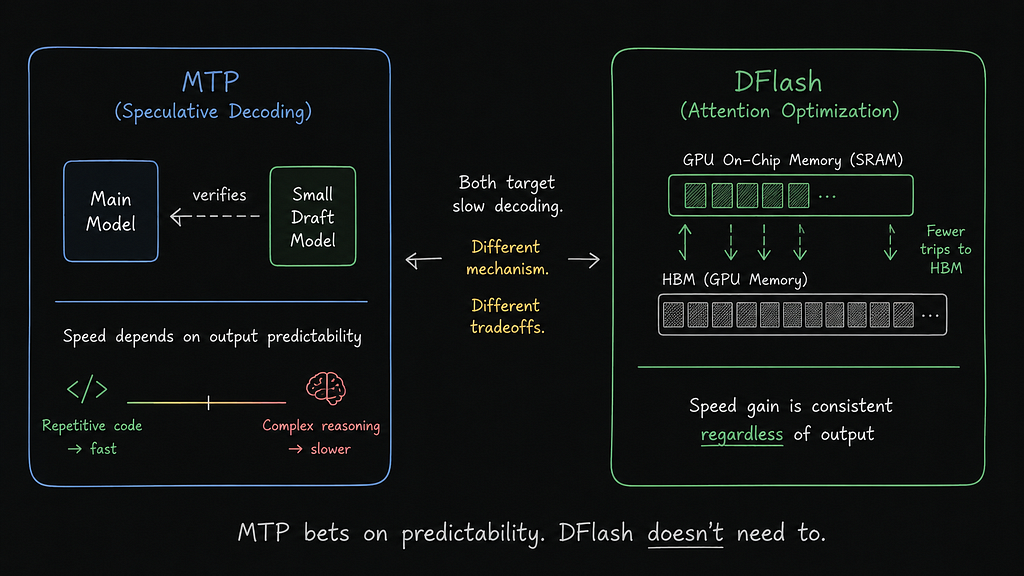
MTP bets on predictability. DFlash doesn’t need to.
If you’re evaluating raw decoding speed versus speculative decoding, my Gemma 4 MTP testing is worth reading alongside this BeeLlama benchmark because the two approaches solve the same bottleneck in very different ways.
Who Should Use It?
Switch now if:
- You have an RTX 3090, 4090, or similar CUDA GPU
- You primarily use Gemma 4 31B
- Your primarily use Qwen 3.6 27B
- Your workload is agentic coding
- You’re comfortable using a fast-moving fork
Wait if:
- You need maximum stability
- You’re serving production workloads
- You’re on AMD
- You’re Apple Silicon
- You’re primarily focused on low-VRAM setups
The practical solution is simple:
Run BeeLlama for active coding sessions and keep a llama.cpp server as a fallback.
That’s currently what I’m doing.
The Bigger Question
Some people are understandably hesitant to depend on a fork maintained by a single developer.
That’s a real risk.
If development stops, the project stops.
At the same time, many of the most impactful optimizations in local AI started life in forks before becoming mainstream.
Whether DFlash eventually influences llama.cpp remains to be seen.
But after using v0.2.0, it feels less like an experiment and more like an early glimpse of where local inference performance is heading.
Final Verdict
A month ago, BeeLlama lived in my “Interesting benchmark project” folder.
Today, it’s running alongside my primary inference stack.
I’m still keeping a llama.cpp server as a fallback.
I’m still not ready to call BeeLlama boringly reliable.
But for the first time, I’m recommending it for real agentic coding workloads.
Benchmarks made me reinstall it.
Stability is what made me keep using it.
And that’s ultimately the conclusion of this BeeLlama v0.2.0 DFlash review.

Continue Reading
If you’re building a local AI stack, these articles connect directly with the ideas explored here:
- Best Local LLM for 8GB VRAM Coding? I Tried Everything.
- I Spent 3 Nights Testing Gemma 4 (MTP)
- I Ran Qwen3.6 Locally. The Thinking Mode Changed How I Use It
QUESTION I HAD BEFORE TRYING IT OUT MYSELF
Does BeeLlama work with Ollama or LM Studio?
Not directly. BeeLlama runs as its own llama.cpp-compatible server and exposes an OpenAI-compatible API.
Is DFlash the same as Flash Attention?
No.
Flash Attention: https://github.com/Dao-AILab/flash-attention
DFlash specifically targets decoding performance and memory-bandwidth bottlenecks, while Flash Attention is a broader attention optimization.
What happened to TurboQuant?
TurboQuant is still available in BeeLlama. The v0.2.0 release primarily focused on DFlash and stability improvements.
Can DFlash be combined with speculative decoding?
Yes. The maintainer has confirmed support for combining DFlash with techniques like ngram speculation and copyspec.
Will BeeLlama eventually merge into llama.cpp?
Probably not directly, but successful ideas from forks often influence future upstream implementations.
I Uninstalled BeeLlama. Then v0.2.0 Changed My Mind. was originally published in Artificial Intelligence in Plain English on Medium, where people are continuing the conversation by highlighting and responding to this story.

